
Loftia housing at a glance
| Your home | A personal floating island |
|---|---|
| Used for | Farming, crafting and decoration |
| Community | Islands link into shared neighborhoods |
| In the demo | Home setup and decoration |
| Demo reward | Neighborhood Demo Banner |
| Optional extras | Cosmetic purchases |
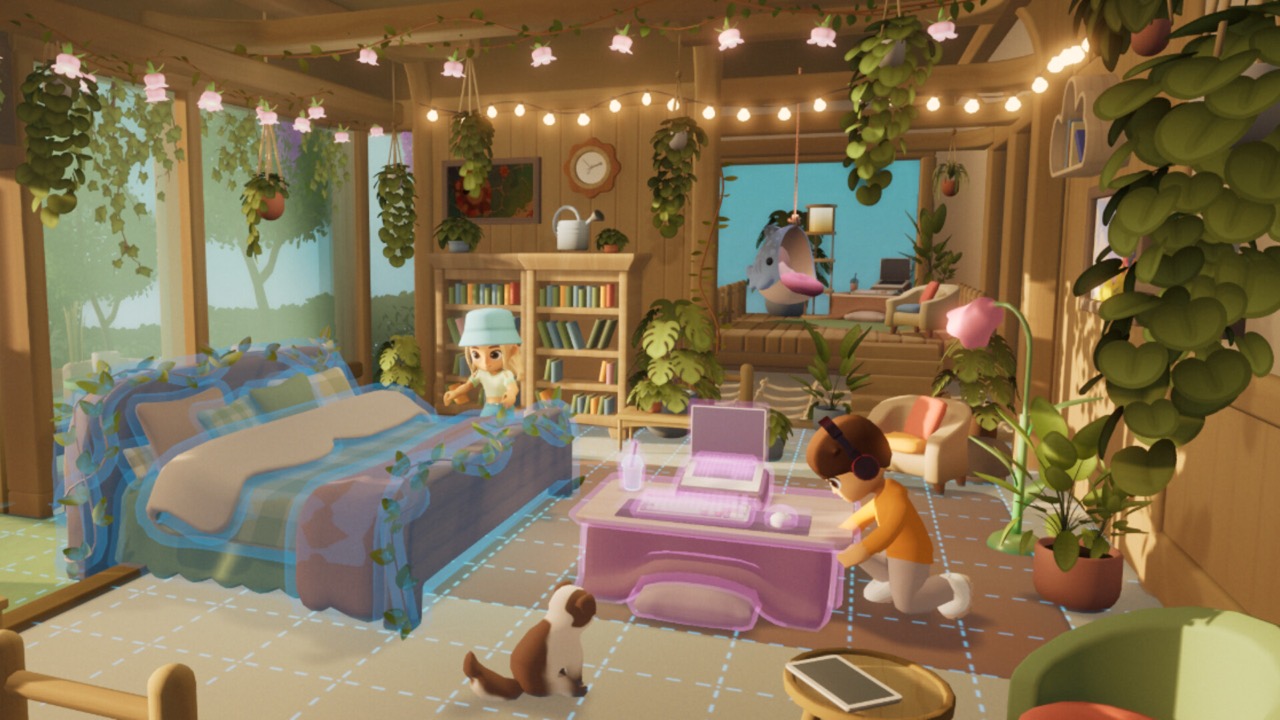
Your island and the shared neighborhood
Housing in Loftia starts with your own floating island. The official website describes personal islands where players farm, craft and decorate. Your island is your space to shape however you like. It is the base you return to between quests and activities.
Those islands do not float alone. The official website describes them linking into shared neighborhoods. That gives housing a social side, because neighbors are part of your everyday life. The current demo announcement confirms home decoration in this shared-neighborhood setting.
Home aesthetics and shared spaces are presented as core official features. An independent Beta preview from The Game of Nerds also described player housing as part of everyday life. A Beta house tour video described a personal floating island with gardening, crafting and decoration. Those sources agree on the basic shape of the system.
Start decorating in the demo
The free demo, running from October 19 to October 26, 2026, includes home setup and decoration. That means you can start making your home your own before Early Access. The official demo page confirms that the trial allows decorating. Broader housing features belong to the Early Access context.
Entering the Player Neighborhood for the first time unlocks the Neighborhood Demo Banner. You claim it through your account on the official Loftia website. Link your website account in-game so your home progress carries over. Linked progress, items and quests carry into Early Access.
Decoration is one of the quickest ways to make Loftia feel like home. Start with a few pieces you like and build from there. The demo lets you try this without any purchase. Your choices carry over once your account is linked.
Arrange farming and crafting space
Your island is also where you farm and craft. Planning space for both keeps your routine simple. Beta previews described crafting machines powered by a battery charged by a solar station on your island. That means your island’s energy setup is part of your home layout.
Farming starts with crops in the demo. Advanced systems such as nutrient-fed Hydroponics Stations come with Early Access. Leaving room to expand is sensible, although exact plot sizes and limits were not verified. Our farming and crafting guides cover those systems in more detail.
Keep frequently used stations close to where you work. That is an editorial suggestion rather than an official rule. A tidy layout makes daily tasks faster and more relaxing. It also leaves space for decoration.
Guest access and crop safety
Because neighborhoods are shared, other players can visit. The developer discussed guest permissions as an evolving design in Devlogs 11 and 12. Specific permission toggles from that time were not a final specification. Treat those notes as historical rather than as proof of the current menu.
A recent creator tips video for the October demo flagged crop protection as a concern. It did not explain a specific permission setting in a readable way. Before inviting visitors to interact with your island, check the current housing options in the game. That is the safest way to protect your crops and decorations.
If you play with friends, agree on how you want to share space and visits. Clear expectations help avoid accidental harvesting or rearranging. The developer’s permission design may give you tools for this in the current build. Look for them in the housing menus.
Playing with friends and neighbors
Loftia is an online shared-world MMO. Friends need to be on the same server to play together, and players are not permanently locked to one server. Visiting each other’s homes is part of the social experience. Solo players can still enjoy housing at their own pace.
The official website advertises shared neighborhoods and group adventures. We do not promise shared ownership of a home or permanent roommate arrangements. Those details were not confirmed in the checked sources. Check the game for how neighborhoods are assigned.
The Hanging Gardens are described by the developer as a place for cooperative community farming. That adds a shared space beyond individual islands. Community projects let neighbors work toward common goals. The Hanging Gardens open in Early Access rather than the demo.
Cosmetics and optional purchases
Loftia is buy-to-play with no required subscription. Optional cosmetic purchases are available separately. The official demo page mentions the Backer Boutique, which sells cosmetics. These items change appearance rather than adding required content.
There is also a Community Pass with cosmetic premium rewards. The official page says those rewards do not expire after the related project is completed. You do not need to buy cosmetics to build a lovely home. Decoration items earned in the game are part of normal play.
Optional cosmetics are entirely a personal choice. The base game includes housing and decoration without extra spending. Prices for individual cosmetic items were not listed in the checked sources. Check the in-game store if you are curious.
What we do not claim
We avoid stating fixed furniture totals, plot limits or expansion prices. Floor-plan sizes were also not verified. Claims of unlimited building are not supported by the sources checked here. Those details need testing in the current build.
Housing is likely to grow during Early Access. The developer describes Early Access as an evolving phase, and bigger world projects expand after launch. Features may be added or changed over time. We will update this guide with verified details.
Your home is also connected to the game’s sustainability theme. Solar power for crafting and sustainable farming systems both live on your island. Building a cozy home and a working homestead go together. That balance is a big part of Loftia’s appeal.
Getting started
Play the free demo, link your account and set up your home in the Player Neighborhood. Claim the Neighborhood Demo Banner through the official website. Decorate a little and plan where your farm and crafting area will go. Your home will be waiting when Early Access opens.
Early Access begins on November 3, 2026 at 1pm EST on Windows and macOS through Steam. The announced US price is US$29.99, with a limited-time launch price of US$24.89. Loftia always requires an internet connection. Wishlist the game on Steam to be notified on launch day.
If you want to compare ideas, the official Discord is a friendly place to share home designs. The developer recommends it for questions and community news. Creator house tours from the Beta can also inspire your layout. Just remember that Beta features may differ from Early Access.
Sources and further reading
- Loftia — Official website
- Qloud Games — Official Steam announcements
- Loftia — Official Demo and Early Access overview
- The Game of Nerds — Playing Loftia’s Beta, May 14, 2026
- Qualbert — Loftia Beta Playtest Preview, May 8, 2026
- Qloud Games — Devlogs 11–12 on BackerKit
- Loftia — Official FAQ
- Loftia — Steam store page and Early Access statement